YouTube is no longer just a platform for views, likes, or viral clips. In 2026, it’s one of the world’s most lucrative creator ecosystems. According to publicly reported data, YouTube has paid out over $100 billion to creators, artists, and media companies in the past four years. (Source: CNBC). This highlights the real earning potential once monetization is unlocked. For many creators, the turning point is qualifying for the YouTube Partner Program (YPP), which unlocks ad revenue, memberships, and additional income streams beyond brand deals.
Despite this massive creator economy, most aspiring YouTubers hit a wall when it comes to monetization. They upload consistently for 6 to 12 months (180 to 365 days), gain traction, and sometimes even go viral, but earn nothing. The reason almost always comes down to one thing: misunderstanding the YPP and how eligibility really works in 2026.
With YouTube expanding monetization through Shorts revenue sharing, fan funding tools, memberships, and multi-tier eligibility, creators are more confused than ever. Many creators assume that reaching 1,000 subscribers automatically unlocks income or that Shorts views don’t count. Both assumptions are wrong. If you’re serious about turning content into real income, the YouTube Partner Program is the gatekeeper. This complete guide breaks down exactly what it is, how eligibility works, why channels get rejected, and how to get approved faster without wasting months guessing.
Quick Summary
TL;DR: YouTube monetization in 2026 is about strategy, not luck. Consistent uploads, Shorts volume, and authentic engagement drive YouTube Partner Program eligibility. Understanding revenue streams, avoiding policy pitfalls, and using ShortVids video production accelerates growth and unlocks smarter earnings. #tldr
- Core Components: Consistent Content → Shorts & Long-Form Strategy → Engagement Over Views → Monetization Compliance → Automation & Analytics
- Outcome: Faster YPP approval, sustainable subscriber growth, higher revenue potential, and efficient content workflow for creators.
Build a monetization-ready YouTube channel.
What is the YouTube Partner Program and how does it Unlocks Real Earnings in 2026?
The YouTube Partner Program is YouTube’s official monetization framework that allows creators to earn revenue directly from their content. Once accepted, creators unlock multiple income streams inside YouTube rather than relying only on brand deals or affiliate links.
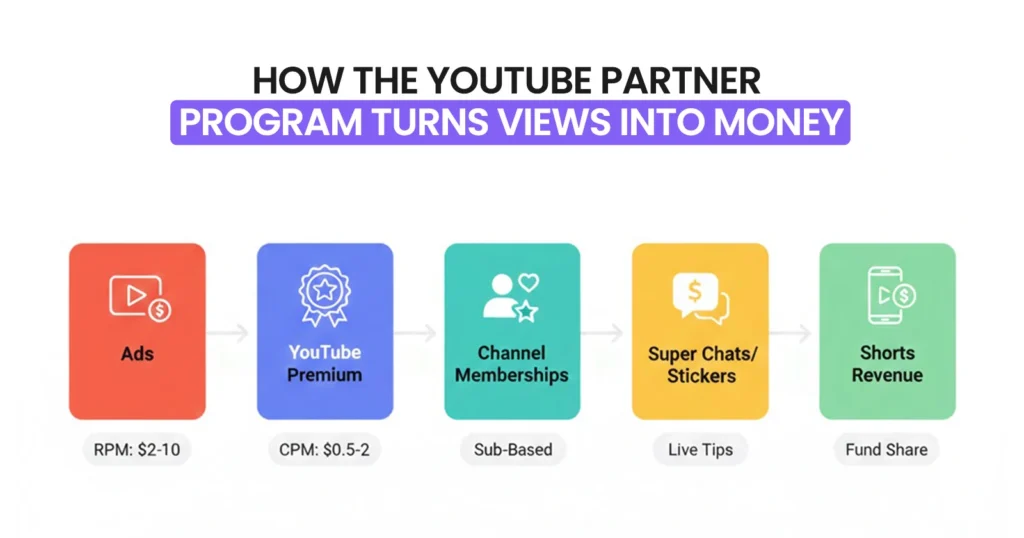
At its core, the YPP gives creators access to:
- Ad revenue placed on long-form videos
- YouTube Premium revenue based on watch time
- Channel memberships with recurring monthly payments
- Super Chats and Super Stickers during live streams
- Shorts revenue sharing from the Shorts ad pool
Views are easy; attention is earned.
What many creators miss is that YPP does not automatically mean income. Approval simply unlocks monetization tools. Earnings depend on how well those collaboration tools are used, what content format you publish, and whether your audience engages in monetizable ways.
For example, a channel with 1,000 subscribers uploading Shorts daily can often earn faster than a 10,000-subscriber channel posting inconsistent long-form videos. That shift is why understanding YPP rules in 2026 matters more than ever.
According to industry data on Wikipedia, YouTube Shorts now generate tens of billions of views every day. And while the average RPM for Shorts is much lower than long‑form videos, roughly $0.01–$0.06 per 1,000 views compared with $1.61–$29.30. This volume helps creators grow faster and reach monetization thresholds sooner.
Breakdown of YPP Revenue Streams
Before you can start earning, it’s important to understand how YouTube’s revenue streams actually work. Each source contributes differently, and knowing the potential impact can help you plan your content strategy effectively.
| Revenue Type | Description | Example Impact |
|---|---|---|
| Ads | Traditional in-video ads | $0.25–$5 per 1,000 views, depending on CPM |
| YouTube Premium | Premium user watch time | $0.10–$0.50 per watch hour |
| Shorts Fund | Shorts ad revenue pool | $0.01–$0.05 per view, scales with volume |
But remember one thing: approval doesn’t guarantee income. Earnings depend on how consistently you upload, which content format you focus on, and how engaged your audience is. Smart use of Short-form videos can accelerate eligibility and maximize revenue potential faster than ever.
How Does the YouTube Partner Program Actually Work?
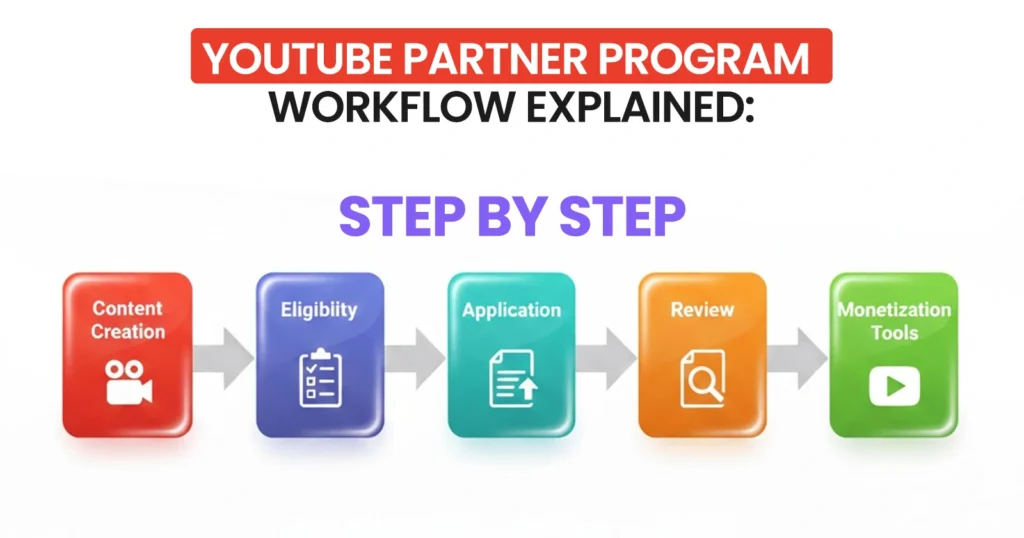
Its helpful for the creators to understand exactly how the YouTube Partner Program operates. They should know everything from eligibility to review and monetization to avoid costly delays, rejections, and missed revenue opportunities.
In 2026, YouTube’s partner approval and monetization flow remains structured but can feel unpredictable if you don’t know what to expect. Especially with review times ranging from as fast as 24 hours to as long as 30–45 days, depending on channel compliance and review volume. (Source: BRANDFLAP)
At a high level, the YPP follows a clear sequence: first, you build advanced content and audience signals, then you prove eligibility, apply through YouTube Studio, undergo a combined automated + human review. And finally unlock the monetization tools that can generate income on your channel through YPP.
How Does the YPP Approval & Monetization Flow Look?
Before diving deeper, here’s the step sequence most creators go through:
- Create original content consistently
- Meet YouTube monetization eligibility thresholds
- Apply through YouTube Studio
- Complete automated and manual channel review
- Unlock monetization features
- Enable ads and revenue tools
This process is linear; missing any step means your application will stall or be rejected.
Step-by-Step YouTube Partner Program Workflow: From Upload to Monetization
Here’s a clear breakdown of every stage your channel goes through so you know exactly what to expect, no surprises, no guesswork.
| Stage | What Happens | Typical Timeframe |
|---|---|---|
| Content Creation | Build videos & grow metrics | Ongoing |
| Eligibility Check | System verifies subs/watch hours or Shorts views | < 48 hours |
| Application Submission | You accept the terms & links of AdSense | Same day |
| Automated Screening | System checks basic compliance | 1-3 days |
| Manual Review | Reviewers assess content quality & policies | 7-30+ days |
| Monetization Tools Active | Ads/Shorts/Subscriptions enabled | 24-48 hrs after approval |
Once YouTube approves your channel, monetization features don’t always activate immediately for all formats. Revenue tools are rolled out based on the content type and eligibility path (long‑form watch hours vs Shorts views).
What Happens During Each Step?
Here’s what actually happens at each step of the YouTube Partner Program, so you can plan smarter and avoid delays in getting your channel monetized.
1. Content Creation
YouTube looks for consistent uploads, authenticity, and originality, especially after the July 2025 policy emphasizing human‑created value over repetitive or AI content.
2. Eligibility Check
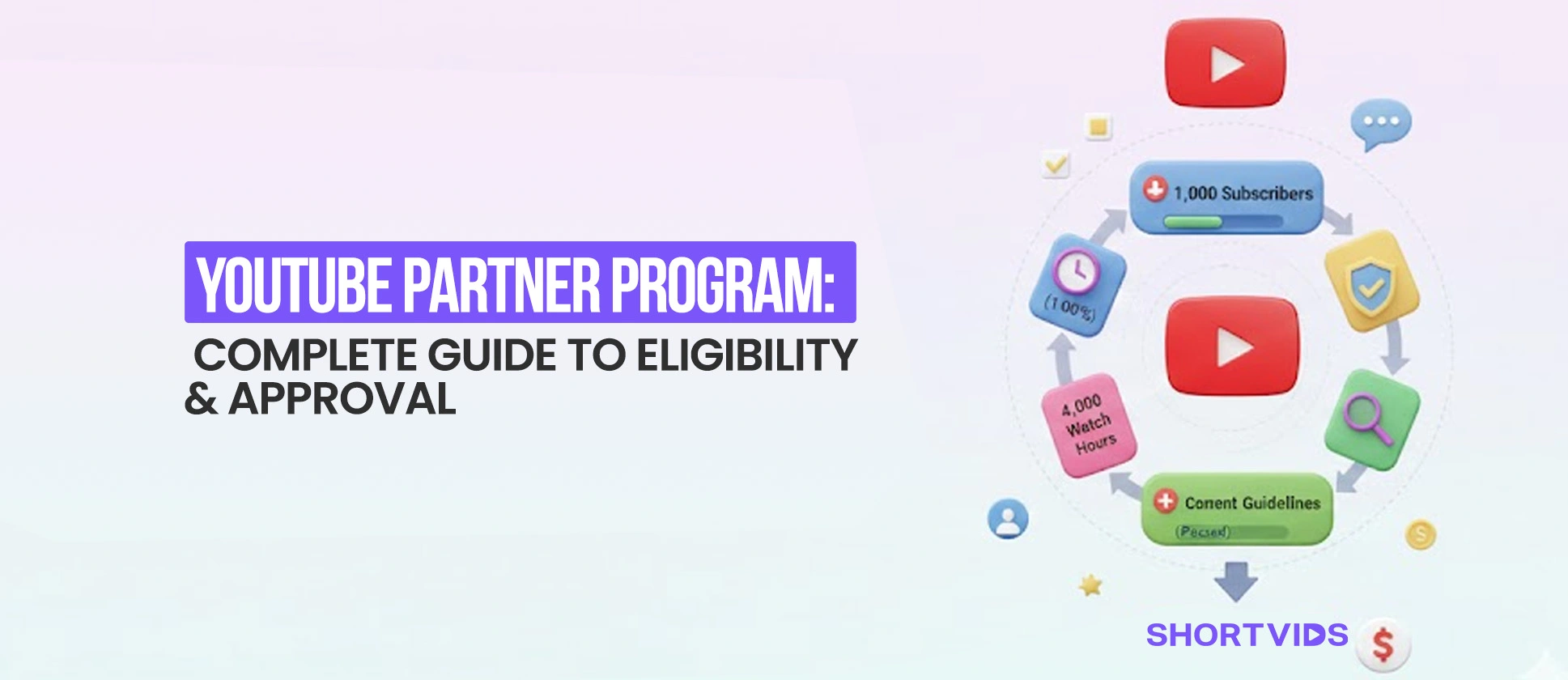
YouTube verifies if you’ve hit the subscriber count and either 4,000 watch hours or 10 million public Shorts views.
3. Application Submission
Within YouTube Studio, you accept terms, link AdSense, and hit submit. An AdSense review sometimes runs in parallel.
4. Review Stage
After automated checks, human reviewers assess content for policy compliance. This is the longest phase and often takes 1–4 weeks.
5. Monetization Tools
Once approved, ads typically start showing within 24–48 hours, and you can enable all available revenue streams.
Knowing this sequence and the time each phase usually takes lets you plan uploads, manage expectations, and avoid common pitfalls that delay approval.
What Are the YouTube Partner Program Requirements in 2026?
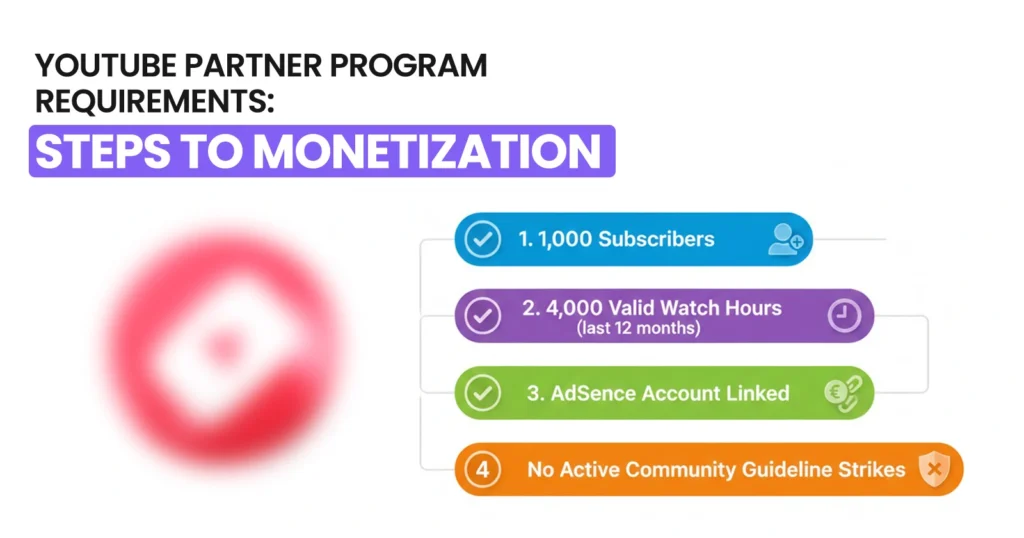
This is the most searched and misunderstood part of the YouTube Partner Program. Requirements go beyond subscribers and watch time. YouTube’s Partner Program requirements combine account conditions, location eligibility, and metric thresholds. Before applying, you need to meet these foundational rules.
According to YouTube’s official documentation, your channel must follow monetization policies, link a valid AdSense account, and have no active strikes. These steps ensure your channel is compliant and ready for revenue.
Basic YouTube Monetization Eligibility Checklist
Before YouTube even considers your numbers, your channel must meet these conditions:
- You must be 18 years or older
- Your channel must be based in a YPP-supported country
- Two-step verification must be enabled on your Google account
- Your channel must have no active Community Guideline strikes
- You must link a valid Google AdSense account
Failing even one of these can delay approval, regardless of your increased views. Meeting all of them simply unlocks the ability to apply for YouTube monetization, but approval still depends on YouTube’s review process.
Avoid rejection. Apply with confidence.
What are the Subscriber and Watch Time Requirements
Hitting the right numbers is often where creators or top brands get tripped up. Many assume they need to hit both subscribers and watch hours, but that’s not true. You only need one eligibility path to apply for the YouTube Partner Program.
Choosing the right strategy for your content type can save months of effort and accelerate monetization.
| Requirement Type | Threshold |
|---|---|
| Subscribers | 1,000 |
| Watch Hours | 4,000 public hours in 12 months |
| OR Shorts Views | 10 million public views in 90 days |
| Volume and value win: the algorithm rewards creators who give both to their audience.
For Example:
Creators like Alan Chikin Chow leveraged short‑form videos to grow to 110 million subscribers and nearly 59 billion views, demonstrating how focused Shorts output can help channels hit YPP thresholds and unlock monetization faster than traditional long‑form strategies.
What Is the New 500 Subscriber Expanded YPP Tier?
YouTube recognized that many small influencers struggle to access monetization early, even when building loyal audiences. To help, they introduced a 500-subscriber tier, giving emerging creators early access to fan engagement tools.
This approach allows YouTube channels to start generating limited revenue and interacting with their community while continuing to grow toward full Partner Program eligibility. Think of it as a “warm-up stage”, you’re monetizing in part, learning the tools, and preparing for the bigger revenue streams once you reach full YPP status.
To qualify for the 500-subscriber tier, your channel must meet all of the following:
- At least 500 subscribers
- At least 3 valid public uploads in the last 90 days
- Either: 3,000 valid public watch hours in the last 12 months OR 3 million valid public Shorts views in the last 90 days
What This Unlocks at 500 Subscribers:
| Feature | Access at 500 Subscribers? |
|---|---|
| Channel Memberships | ✅ Yes |
| Super Chats & Stickers | ✅ Yes |
| Fan Funding Tools | ✅ Yes |
| Ad Revenue | ❌ No |
| YouTube Premium Revenue | ❌ No |
| Shorts Revenue Sharing | ❌ No |
This tier is ideal for testing monetization tools and building engagement without yet earning full ad or Shorts revenue.
How Does YouTube Shorts Monetization Compare to Long Form Videos?
Monetization strategies have shifted dramatically in 2026, and Shorts are at the center of that change. Unlike traditional long-form YouTube videos, which earn primarily through direct ad revenue, Shorts revenue comes from a shared pool.
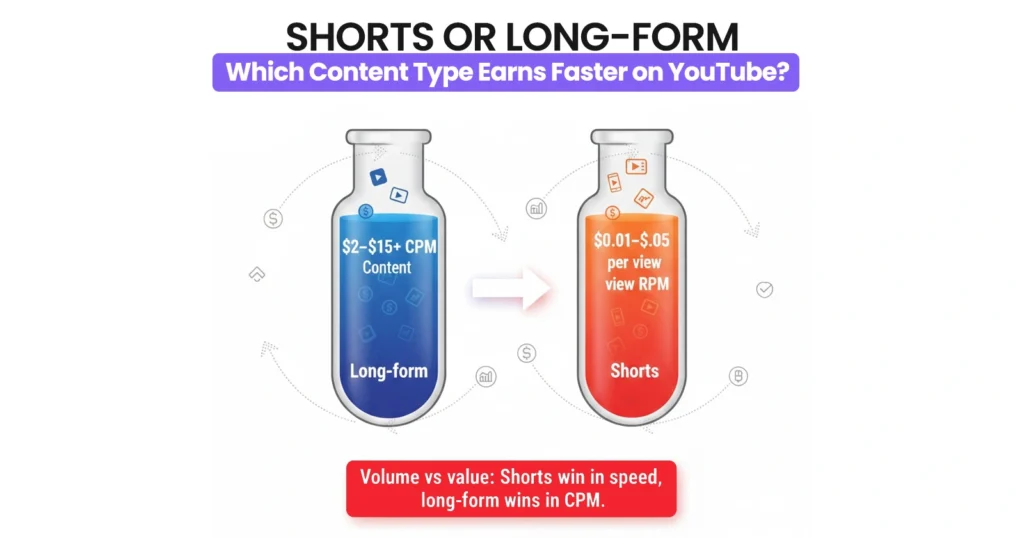
One needs to understand these differences is critical for creators aiming to reach YPP faster while maximizing earnings. Properly leveraging Shorts can accelerate subscriber growth, increase watch time, and unlock monetization sooner, even before your long-form videos start generating significant revenue.
Automation isn’t cheating; it’s scaling creativity without losing quality or consistency.
How Shorts Revenue Sharing Works
YouTube places ads between Shorts in the Shorts feed, creating a shared revenue pool distributed to creators based on performance metrics:
- Total Shorts views: higher view counts earn a larger share
- Engagement: likes, shares, and watch time influence payouts
- Music licensing deductions: certain tracks reduce earnings
Creators typically keep 45% of Shorts ad revenue, compared to 55% for traditional long-form video ads. For example, creators like MrBeast 2 (Beast Reacts) utilized YouTube Shorts to accelerate audience growth. Thus, generating tens of millions of views per day and speeding up eligibility for monetization, even while their main long‑form channels continued to grow.
CPM Differences That Matter
While long-form videos often earn higher CPMs, Shorts make up for it with volume and speed. Understanding these numbers helps creators plan which content to prioritize for YPP eligibility.
- Long-form CPMs: $2–$15+ depending on niche and region
- Shorts RPMs: $0.01–$0.05 per view, but high volume can scale earnings
- Shorts are easier to produce, allowing multiple uploads daily for faster growth
Note: These RPM values vary by niche, location, and audience demographics
Why Shorts help reach YPP faster
Shorts give small creators a fast track to monetization without heavy production time. The format also leverages YouTube’s algorithm to boost engagement and subscribers.
- Higher discoverability through the Shorts shelf
- Faster subscriber growth via viral potential
- Lower production effort compared to long-form
- Algorithm prioritization boosts consistent creators
Many creators now use Shorts to qualify for YPP quickly, then gradually pivot to long-form for higher CPMs. Agencies like ShortVids help creators optimize Shorts output efficiently, reducing editing time while maintaining consistent engagement and growth.
How Can You Apply for the YouTube Partner Program Step by Step?
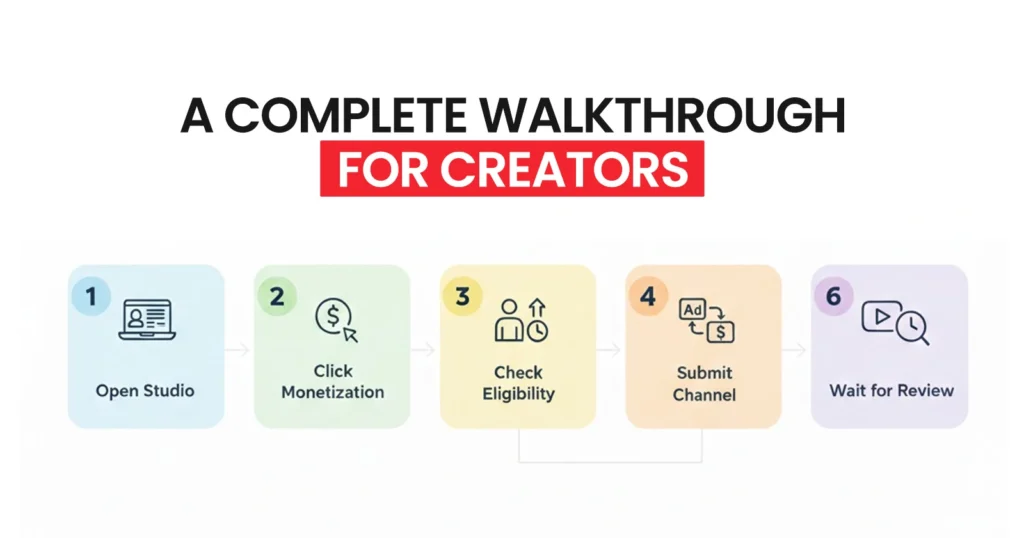
Applying for the YPP is simple, but small mistakes can delay approval. Knowing each step and what reviewers check for helps you avoid common pitfalls and start earning faster.
1. Open YouTube Studio: Log in to your YouTube account and open YouTube Studio on desktop or mobile. This is your central hub for managing content, analytics, and monetization.
2. Click the Monetization Tab: From the left-hand menu, select the Monetization tab. This is where you’ll see your eligibility status and can start the application process.
3. Review Eligibility Status: Check that your channel meets all YPP requirements, including subscriber count, watch hours, or Shorts views. You must also have no active Community Guidelines strikes.
4. Connect Your Google AdSense Account: Link an active AdSense account to receive payments. Without this step, even approved channels cannot monetize.
5. Submit Your Channel for Review: Once everything is ready, submit your channel. YouTube will perform a manual review evaluating content originality, copyright compliance, and overall channel purpose.
6. Review Timelines: Some channels are approved in 48–72 hours, while others take 2–4 weeks. Delays usually indicate reviewers need more signals of originality or policy compliance.
Delays often indicate reviewers need more evidence of originality or policy compliance. Staying consistent with uploads, using original content, and ensuring proper metadata can help speed the process.
Why Do Channels Get Rejected From the YouTube Partner Program?
This is one of the highest-intent sections for creators, especially after receiving a rejection notice. In most cases, YouTube does not reject channels for low video views or slow growth, but for policy-level content issues. In 2026, the review process is far stricter around originality, copyright safety, and creator value.
Common Reasons for Rejection
Most rejections happen because YouTube cannot clearly identify the original creator value in a channel’s content, which often results in demonetizations, too. Reviewers look for meaningful transformation, human input, and policy-safe assets rather than recycled or automated formats.
1. Reused content is one of the most frequent causes of rejection, particularly when videos are stitched together from other creators’ clips without meaningful transformation or commentary.
2. Compilation videos without transformation often fail review when they simply repackage existing content instead of adding analysis, narration, or creative structure.
3. Reddit reads without commentary are commonly rejected when text or AI voices read posts verbatim without personal insight or original discussion.
4. AI voice slideshows trigger rejection when visuals and narration are auto-generated with no visible human involvement or creative effort.
5. Low-effort formats such as static image slideshows, basic text-on-screen videos without narration, or looping clips signal minimal creator value to reviewers.
6. Copyright issues remain a major blocker, especially when channels use unlicensed music, TV clips, movie scenes, or Shorts with copyrighted audio used outside allowed contexts.
7. AI misuse in 2026 is increasingly flagged when channels mass-produce templated videos, reuse identical scripts, or fail to show a clear human creator behind the content.
How Long Until You Can Reapply?
A rejection isn’t permanent, and YouTube gives creators a clear window to fix issues before trying again. The 30-day reapplication period is meant for meaningful improvements, not cosmetic changes.
You can reapply after 30 days. You can use that time to delete or privatize reused videos. On the other hand, you can also add voice commentary in your videos to avoid plagiarism or make it authentic. But the key to success is to upload original content consistently on your YouTube channel. Most creators use or follow a YouTube content calendar for consistent posting or rapid channel growth.
How Long Does It Take to Start Earning After Approval?
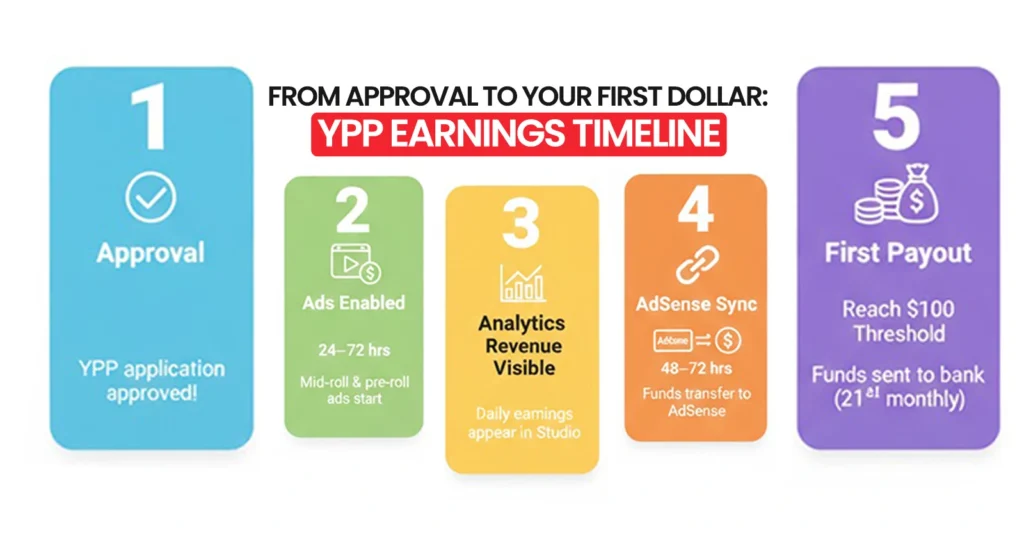
Getting approved for the YouTube Partner Program doesn’t mean money starts flowing the same day. Once your channel is accepted, ads typically begin appearing on eligible videos within 24 to 72 hours, but revenue reporting always lags behind actual views. This delay often confuses new creators who expect instant earnings.
Ad revenue usually shows up in YouTube Analytics first, then syncs with Google AdSense after 48 to 72 hours. Even then, payouts are not released until you cross the $100 minimum payment threshold, which is calculated on a monthly cycle. Depending on upload frequency, niche, and content format, this can take anywhere from 2 weeks to 3 months for newer channels.
For example, finance creator Graham Stephan has publicly shared that during his early YouTube days, his first few months of monetization generated under $150 total. As watch time and CPM improved, monthly earnings scaled rapidly. Smaller creators today often see similar patterns, especially Shorts-focused channels that earn smaller amounts per view but grow volume faster.
In most cases, creators posting 3–5 videos per week using a content calendar begin seeing their first payout within 30–90 days. While inconsistent upload schedules can push this timeline much longer.
How Can ShortVids Help Creators Reach YPP Faster and Monetize Smarter?
One of the biggest blockers to YouTube monetization isn’t talent or ideas but consistency at scale. ShortVids is built for creators who want to grow faster without spending hours editing or managing uploads.
By automating Shorts production, formatting, and posting, ShortVids helps creators publish high-retention content daily, which directly accelerates subscriber growth and Shorts view velocity.
For creators targeting the 10M Shorts views path, this kind of content automation can cut months off the journey to YPP eligibility. Instead of burning time on repetitive edits, you focus on ideas and performance while ShortVids handles execution. The result is faster momentum, cleaner workflows, and a smarter path from approval to actual income.
Case Study: A creator, Cody Blundell, scaled his channel by publishing 230+ polished Shorts with ShortVids, boosting views, engagement, and subscriber growth while saving hours of editing. This demonstrates how automation accelerates YPP eligibility and revenue potential.
Your Takeaway!
The YouTube Partner Program is not about luck or viral hits. It’s a structured system with clear rules, and creators who understand those rules get paid faster. Whether you focus on Shorts, long-form, or both, meeting eligibility is only step one. Execution is what turns approval into income. If you want to stop guessing and start monetizing with intent, your content workflow matters just as much as eligibility. Hit YPP faster by letting ShortVids automate your Shorts creation and posting from start to finish. Schedule a Call Now!
Frequently Asked Questions
Yes. Applying and joining YPP is completely free. YouTube earns revenue by sharing revenue, not charging creators upfront.
Yes. Violating policies, receiving strikes, or long periods of inactivity can remove monetization.
No. YouTube pays based on ad impressions, watch time, and engagement, not raw views.
Yes. Shorts creators can qualify through the 10M views threshold and earn via Shorts ad revenue sharing.
Yes. Many small channels earn consistently once monetization tools are used correctly and combined with Shorts growth.
Book a Call Today
- Fixed monthly plans starting at $999
- 24-hour turnaround time (or less) on all short-form edits
- 3-layer quality check system on every video
- No more chasing freelancers or managing editors
- Scale up to 50+ videos/month without hiring in-house
- Content team trained on platform trends, scroll-stopping hooks & storytelling
- Fully managed by professionals – you just upload & approve
- Response time: Under 1 hour (US & GCC time zones)
Cut your production costs, not your standards.